
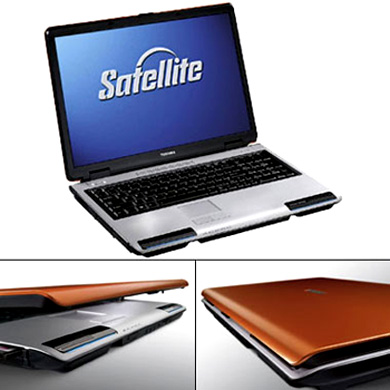
It’s very sexy, but should I get it?
I’ve been thinking about getting a laptop for some time now, even though it isn’t entirely necessary as my desktop PC is still running okay (though it does growl and get cranky from time to time). And then today I came across this Toshiba Satellite P100-233 on special offer for 999 euros. In another shop it was 1899 euros.
The main differences between the two were that the more expensive one had more memory (120 whatsits) than the other one (80), and it had Windows Vista Premium while the cheaper one had Windows XP Media Centre (Vista compatible). Both had the same ‘chassis’ – a 17″ widescreen and a very attractive metallic orange lid.
Any advice? I personally can’t see that a bit more memory and a brand new Windows operating system still probably full of bugs is worth spending almost twice as much for. In fact, I wouldn’t even consider it at the higher price. And actually, I only started seriously considering the 999€ laptop after I saw the other one – I reckoned that if I could get pretty much the same thing for almost half-price then I’d be getting quite a good deal.
Oh, the other thing is that I really can’t afford this (then again, that’s what credit cards are for, aren’t they?). Nor do I really need it at the moment. Though I do think it’s only a matter of time before my desktop starts doing seriously weird stuff rather than just annoyingly weird stuff and I’d like to be prepared for that. Also, I would quite enjoy the freedom of movement a laptop allows you … plus I’m sure Nog would appreciate me not hogging his all the time. 😉
So what should I do?
 casa azahar
Actually, getting the one with Windows XP is a big advantage. I would recommend steering well clear of Vista for a good while yet.
You mentioned memory: 120 whatsits versus 80. You’re probably talking about hard disk size, i.e. 120GB versus 80GB. Unless you anticipate playing lots of very new games or downloading a lot of TV/films off the internet, 80GB will be more than enough. More important than hard disk size is RAM – which is what I would mean if I said the computer’s memory. The more of this you get, the longer the computer will last basically. I wouldn’t want to get one that had less than 1GB of RAM.
LikeLike
Here are the specs…
Satellite P100-233
Core Duo T2300E
512 MB + 512 MB Memory 533MHZ
80GB Harddisk drive (5400) SATEA
DVD – Super-multi drive (2 layer)
17 WXGA + trubrite TFT screen
56K Modem/Lan
W-Lan(802.11 A/B/G)/Bluetooth
MS Window SP MCE
Sound okay?
LikeLike
Sounds top-notch to me, especially for €999. I particularly like having the dual core CPU. I’ve not heard of Satellite before though. Sometimes you find a company that promises a really great sounding PC but you find when you get it that all sorts of things don’t quite work or break within a month. I always get Dell ones myself because they never have that problem, but you’d not get such a high powered PC for that price from Dell.
LikeLike
Doesn’t the satellite thing mean that, depending on your server, you can use those USB plug-in doodads and access the internet from the top of the Himalayas?
Anyhoodle, guess what … I bought it. 🙂
Nog and I went out for a late tapa lunch and after a couple glasses of rioja (and since we were right next to the bus stop that would take us back to the store) I said that I really wanted to have this new option in my life. So off we went…
And after a bit of embarrassing credit card juggling at the check out (don’t ask) I got the thing. Oh, and I’ll also get about 135€ back for the IVA/VAT, which makes it about 865€? So, not a bad deal at all.
I’m soooooooo tempted to start it up and play with it NOW but I think I’ll wait until I’m totally rested and sober tomorrow morning … after at least two cups of strong coffee. I’m terrible at the best of times for never reading the instructions and just plugging stuff in and having a go, which is best to do when one is somewhat alert I reckon.
Oh boy! Feels like Christmas eve.
LikeLike
Hehehe, getting a new computer is such fun. 🙂 And impulse purchases are always the best!
Anyway, my advice (for what it’s worth). Once you’ve had a little play with it, do the following:
Uninstall all the crap software they load it with (although if you’re not sure of what a piece of software does, leave it on ;-)). Especially, all the AOL software if there’s any of that. This’ll save space and make it run faster.
It will probably come with a free for one month virus scanner / firewall. Once that month is up, don’t buy the full version – instead download AVG Free virus scanner and ZoneAlarm free firewall.
Install Mozilla Firefox and Thunderbird for web and email instead of Internet Explorer and Outlook Express. If you’re using Outlook or Thunderbird, make sure the “preview pane” is off. Delete suspect emails without opening them. (If in doubt, click on the email and choose “view->message source” in thunderbird. This is a safe way of looking at an email that will not give you a virus even if there is one in there.)
That’s what I do if I’m setting up someone’s new computer for them. Keeps you nice and secure and free of viruses. If you like, I can email you my three page ‘how to use your computer safely and securely on the internet’ guide I wrote for my parents. They never read it so it would be good if someone did! 😉
LikeLike
Oh yes please! My new gmail address is on the sidebar.
I was going to ask about a virus scanner. Annoyingly I just updated Norton on the desktop last week. I’ll try the AVG one on the laptop and I always use Zonealarm. Also Adaware and Spybot.
I’m using both Outlook and Thunderbird. Good idea about keeping the preview pane off. I’ve always found it annoying that there aren’t little boxes on the side to click and delete emails without opening them.
Anyhow, time to make some coffee and start playing! 🙂
LikeLike
Here I am!
My first posting from the new sexy beast.
Man, do I ever have a lot of crap to set up.
LikeLike
OK email sent.
So is it as shiny and exciting as you’d hoped? 🙂
LikeLike
It’s gorgeous! However, a normal keyboard will be necessary for when I’m working at my desk (like now). Also a normal mouse.
I’ve moved the old monitor over to the bookcase unit next to the desk so that both computers can be on and functioning if necessary, and I’ll probably leave the setup like this.
Meanwhile, it’s taking forever to get set up and I think there’s a problem with the old PC’s CD burner … can’t seem to copy anything in order to transfer it over.
Is there a way of transferring stuff from one computer to another with a USB cable?
LikeLike
I believe it can be done but I’ve not done it and I don’t know how. If both computers are on the internet and connecting through the same router then one way to transfer them is to put them both on the same “workgroup” and copy them across over the network. If you right click on “my computer” and then go to “computer name” you should see a “workgroup” name. Make sure both computers have the same name, will require a restart. Now go to “my network places”. Then go to “Entire Network”, then “microsoft windows network”. You should see the name you gave the workgroup. Open this and you should see the names of the two computers on the network. Choose the folder you want to copy from on the desktop, right click and go to properties. Go to “sharing” and choose “share this folder”. You should now be able to copy from desktop to laptop, etc. Can’t write more now laptop battery about to run out…
LikeLike
Congrats to your new toy, az! 🙂
I used to have a Satellite Pro before my present laptop. Got it some five six years ago, I think, and I believe it´s still running.
I eventually grew out of it – too big images in presentations – and got a new one. Geek inherited it and traded it eventually for an iMac.
It’s like moving to a new home when you get a new computer. Takes a while to get it nice and cozy.
LikeLike
What’s your present one, dq?
To be honest, my computer needs are very simple. But I did want to get a laptop and I like the idea of having a back-up (the still functioning desktop).
Yeah, I think it’s going to be quite awhile before I get everything nice & cosy.
LikeLike
Wellllllll…I would have preferred to be using a Mac when I come to visit next but I guess I can stoop to using another PC. 🙂 Congrats on a spanky new machine!
LikeLike
Actually, you’ll be using Nog’s pissy 15″ square screen HP laptop … 😉
LikeLike
And you’ll have to wait for Azar to finish with it….
LikeLike
This is perhaps a duh question but I’m tucked up in bed here now and the sexy beast is running on battery. I notice it’s lasting a lot longer than Nog’s does.
So my question is … should I keep the computer plugged in most of the time, or should I sometimes let the battery run down, or what?
LikeLike
Well, they tell you that to maximise the battery life you should run it down occasionally. For what it’s worth, I use my laptop quite a lot and tend to let it run down to the 10% level (when it starts flashing) once a day (that takes about 2-3 hours of use) and the battery performance seems to be as good as it was a year ago.
LikeLike
Okay, I haven’t yet seen the battery icon start flashing. On Nog’s it doesn’t flash at all – you just get a two-second warning to plug in before it goes into hibernation. Annoying.
This morning I went out and bought a USB plug-in keyboard to use while I’m sitting at the desk as I really cannot stand the laptop keyboard (unless it’s actually sitting on my lap, as it is now – I’m on the sofa with my feet up). And Nog has lent me the USB optic mouse he got when he was working on the translations. He actually likes the laptop mousepad. I hate it, especially for scrolling.
I was going to get a wireless keyboard and mouse as I reckoned they would have a USB receptor thingy to plug into the laptop. Nope. All the ones I saw had long cables and then a receptor that had to sit on the desk. Oh, and then there would be constant battery replacing for the mouse and keyboard.
So – much cheaper than a wireless – I got a plug-in keyboard to use at the desk and it’s even got a groovy-cool scroll wheel on it, on the left hand side of the keyboard. Which is going to seriously give my right hand a rest once I get used to using it.
LikeLike
New computer envy, here! Glad you got it though, it’s quite a good deal for that much beast. 🙂
LikeLike
Pingback: computer juggling « casa az