

But although she is portable, I have actually never taken her out of the house and for the most part she either sits on the desk in the living room, or comes to bed with me when I am having my morning coffee. I have never dropped her, nor banged her against anything, and so imagine my horror when I saw THIS the other day …
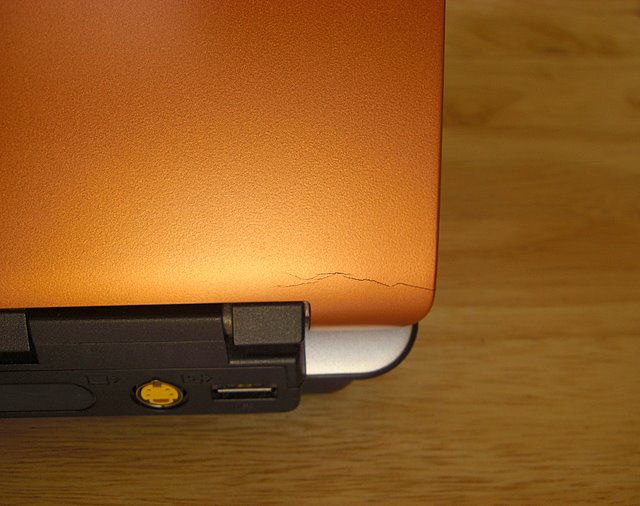
And I’m not sure what to do about it. It may just be cosmetic, or it may be something that, if it gets worse, might affect the performance of the screen. So yesterday Nog and I took SB out on her first outing, back to the shop where I bought her just under two years ago (and so there are still about two weeks left on the warranty). The guy at the shop said that SB would have to go back to Toshiba and that they would decide there whether this problem would be covered or not (I was told that they would most likely think the damage had been caused by me).
EXCEPT, the hinge on that side has always been quite stiff, and on occasion it makes a loudish crack sound when I open the lid. So I think it has to do with that.
But now I’m in a bit of a quandary because if I send SB in for repairs they said it would be about a month before I got her back again. A month without my laptop??!!! And to make matters worse, Nog’s laptop has been on the fritz the past couple of weeks (scary blue screen of DEATH issues again) so this would leave me … gasp! … with no internet connection at home. And okay, before the jokes start pouring in, I do actually need a computer here because so much of my work – and especially possible future work – depends on having regular internet access.
Has anyone ever had a similar problem with their laptop? Do you think I should just leave it or does it look like it might end up getting worse and fucking up the screen (which is the most expensive part of the computer)? I need to decide what to do before I start chemo on Thursday…


I would just keep using it.
LikeLike
Dells get this all the time too – no real effect on the LCD for now, but as the crack gets worse, stress will be transmitted to the screen. Best to make Toshiba cover it now.
LikeLike
More – the damage is most likely due to a molding flaw in the plastic, since it looks more like it’s traveling along a flow line (knew all that plastic modeling knowledge would have a real-life application one day!)
LikeLike
This is such a bummer. I would be lost without being able to be connected to the internet. Even so, I would send it in since it is still under warranty with the hope it would be covered. It is too bad you can’t find that fact out before having to give it up. Do make a back up of everything in case they wipe everything out.
LikeLike
Hi girasoli – nice to see you here! 🙂
Yeah, that’s the real bugger of it. Not only will I have to be without my laptop for a month but I don’t even know for sure if they will fix it. Mind you, after chatting with FFE about it a bit more last night it sounds like this sort of thing isn’t uncommon.
You see? Yet another reason I can’t live without internet. FFE just happened to be online when I published this post and so I asked him if he knew anything about this … and boy did he ever! Here are a few more points he made during our IM chat…
So it looks like I’ll be sending my baby to computer hospital this week. If we can’t get Nog’s laptop up and running he might actually end up getting a new one, which is something he’s been thinking about for awhile. So at least there would be one working computer in the house. We shall see …
LikeLike
Umm… “there are still about two weeks left on the warranty”…
Aren’t these things supposed to happen just *after* the warranty expires?
LikeLike
I know, it’s like when Nog’s hard drive kicked the bucket just one week before his warranty expired (Sept 2006) … he was lucky, even though his laptop also spent a month at computer hospital. I mean, when you consider that it can’t take more than half an hour to install a new hard drive…
And so, I guess I’m lucky too. If this had happened two weeks from now I’d have been SOL. I don’t know what I’ll do if they won’t fix SB on warranty though.
Anyhow, at least a decision has been made. Now I’ll just have to deal with the consequences.
LikeLike
Oh, the horror of life with no internet. I remember when we had the big ice storm and the power was off here for 13 days. I thought I would go crazy. And I don’t even need it for work. Hope the thing is fixed PDQ.
LikeLike
Yikes! You would have to resort to visiting an internet cafe!
Re: the ice storm… I was very lucky that when we were affected by “The Great Ice Storm of 1998” 1) I didn’t have internet at home but ran the internet cafe at Chapters, where I worked and 2) we only lost our power for 8 hours.
Our minister at the time lived in Maxville, the last community to get its power back.
LikeLike
Definitely take advantage of the fact it’s still under warranty. And good luck.
LikeLike
Gaffer tape and silicon spray.
First carefully apply a cut and shaped piece of gaffer tape (you know the silver, fabric based adhesive tape) across the crack. This will reduce the chance of further cracking.
Then very carefully, with your laptop powered off, give the hinges each a short burst of silicon spray with the laptop open and again with it case closed. Work the hinge a little. If it still makes a cracking sound you have a moulding defect inside the hinge, possible some mould flash.
If it doesn’t the job’s a good un and you can carry on using your baby, though she will never be so pretty again… c’est la vie.
A more permanent solution for the crack is epoxy resin…
I knew thirty years in the electronics industry would come in useful eventually 😉
LikeLike
I’ll keep that in mind if they don’t end up fixing SB on warrantly, Mochenddu (couldn’t you have chosen an easier new nickname, Math?). But I do think I should give it a try at least. Might even ask about upping the RAM and hard drive memory while they’re at it if it doesn’t cost too much.
LikeLike
Oddly enough, my last laptop (the one before my current handmedown), developed a crack in the hinge area, accompanied with a cracking noise on opening and closing. Soon, the crack was also developing on the other side, then a crack appeared across the hinge in the center part of the hinge. I had to stop using that one, as the screen innards would start slipping out the bottom of the hinge gap. At the end, I was holding the edge of the screen frame in using a binder clip. FFE is right, go for a repair; if they don’t fix it, then go with Math’s advice vis a vis the silicon spray. Lubricating the hinge will lessen the stress on the hinge.
Hugs and Snibbles, for you and for SB.
LikeLike
Hey, I remember the binder clip episode, SC. But I didn’t connect that with this problem. You know, it’s really good to know this is pretty common, so Toshiba shouldn’t try and wriggle out of it. And just looking at SB, you’d be hard pressed to find even the eensiest of a scratch on her with a magnifying glass, so you would never suspect “abuse”.
But seriously … a WHOLE MONTH without a computer at home? And especially during chemo?? I dunno, I just dunno …
“You would have to resort to visiting an internet cafe!”
Aaack! That would almost be as bad as going to a laundrette! And in any case, aside from checking email and doing a bit of surfing (which I can actually do on the iPhone) it would be pointless because I wouldn’t have ALL MY STUFF (bookmarks, photos, programmes). Been trying to get Nog’s old beast to work again but I think it’s definitely kicked the bucket this time. The Blue Screen Of Death says it’s to do with “unmountable_boot_volume”. Whatever.
Well, there is still a week or so to go before I have to bring my baby in.
LikeLike
Pingback: the brick is back! « casa az
Pingback: the beast is back! « casa az