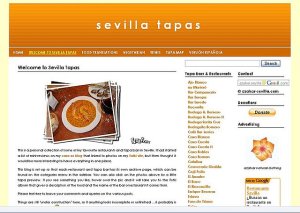
 ~ original Sevilla Tapas theme ~

 ~ possible new theme ~

Which one do you like best?
(bear in mind that the Spanish version is less complete than the English one)
Whilst in the throws of trying to update my WordPress the amazing Beth came to my rescue and offered to do the upgrades over the next few days. She also suggested I look at some other themes because the latest 2.7 version of WP might not support my old theme. We both liked the one with the oranges on it, though I would need to tweak it a bit before it could be used. The most important changes would be to have single spacing between the Tapas & Restaurants category links, and that when you open a category you can see both posts opened up including the photos, not just the post titles like they are now. I’d also like to change the link colour from dark blue to dark green and get rid of the orange slices in the comments.
Another option would be to change the Tapas & Restaurants widget to a drop down and combine the two posts (review & location and photos) into one post. Click on Enrique Becerra in the sidebar to see an example of this. Do you think that people will know to click again on the title to open it up?
I could also turn all the posts into pages and get the list off the sidebar altogether. That way I could also group them by food type or location. Or maybe I should just stick with the old theme?
Feedback and suggestions would me much appreciated.
Thanks!
 casa azahar
definitely the second one: its cleaner and clearer looking with that contemporary minimalist design.
I’m not sure about the other questions – I guess it depends what people use the site for specifically and I would guess that will vary (unlike those of us who are miles away and just like to look at lovely food pics!).
LikeLike
I definitely think you should go with the new theme. I also like the idea of putting it all together. I personally hate to go from page to page to find something. Having a review, pictures, and a map is great. If you can give people some idea of the prices, that would be good, too. Here they use dollar signs, $=cheap, $$$$=very expensive. You can put a legend that would say expect to spend between this much and this much for these dollar signs. I also like what whoever suggested, to put it on Google earth to drive traffic to your site, also. I don’t like the posts into pages thing, because you have to have some way for people to find them, and that could get very cluttered. Also agree with the dark green. That kind of stuff is easy enough to do with CSS. If you do change from posts to pages, you should include a menu, too. Maybe you can get a menu and scan it in so folks can see the menu itself.
LikeLike
“That kind of stuff is easy enough to do with CSS.”
Well, I managed to change the font and do a couple other small tweaks, but I don’t know where to find the place to change the link colour.
Any geeky person out there know how to do this?
And – more importantly – how to tweak the archives thingy so that when you click on the restaurant category you get all the posts opened up and not have to click on them separately?
Thinking it over, I prefer having separate posts for each restaurant category because I’m also thinking of doing recipes. And there could also be one for menus – good idea, Silverstar.
And of course all the ‘reviews’ need to be properly written. When I do that I’ll also include a € €€ €€€ rating thing.
Eek, I’m late for yoga!
LikeLike
Aaack! The new theme is doing weird things. Can’t get pages to work (only posts) – when I publish new pages I get page links showing up all over the front page! I tried it out on the old theme and it works fine, so it isn’t an upgrading glitch. And so I’ve written to the theme designer. If I can’t sort this out I’ll have to choose yet another new theme. Damn!
LikeLike
I like the clean look of the new theme, so ifyou can’t get it to work then look for a theme that has that unclutteredness in it.
Good luck! This looks like a lot of work, is it one of the “baby” steps??
LikeLike
It’s a huge amount of work, hmh, and not exactly one of the “baby steps”, more like be getting sidetracked … but it’s all towards the same goal. And before I place all the google maps I want to be sure about which theme I’m using and what sort of set up I’ll be using.
Anyhow, Pip and I will be meeting again this weekend to plan next week’s “baby steps”.
LikeLike
Oh.
My.
God.
I just changed the whatsit so that now the posts open up when you click on the restaurant category … WOW!
See?
http://azahar-sevilla.com/sevillatapas/category/eslava/
LikeLike
It looks gorgeous. I would almost get on a plane to go check these places out, and anyone who knows me will tell you I don’t even go downtown. What’s the “especial liqueur de Badajoz” like? (I love “tapa mapa”.)
LikeLike
Love the tapa blog – yum!
LikeLike
Okay, I must say THIS LOOKS GREAT! Tapa Mapa is Very Clever. Did you come up with that yourself or was it a drinking insight with Pip? 🙂
LikeLike
Tapa mapa is just what it’s called in Spanish, so neither clever nor drunkenly insightful, I’m afraid.
I believe the “especial liqueur de Badajoz” was rather sweet and lemony.
Anyhow, here is another updated version. This one shows the tapa map on the sidebar linking to the main map, and just a text link to the individual map in the post. I’ve also added two posts where I would like to put photos of the menu and maybe some recipes. And I’ve changed things so that comments can only be left on the main info post.
What do you think? Is the text link to the map okay or should I put an icon of some sort?
http://azahar-sevilla.com/sevilletapas/category/tre-fratelli/
LikeLike
Pingback: new azahar-sevilla theme « casa az